The AI-Cited Media feature in the AI PR Toolkit helps discover which media outlets are cited most frequently within your chosen context - across multiple AI platforms, including ChatGPT, Gemini, Google AI Overview, and Google AI Mode. Knowing which outlets are worth pitching is the first step to effective outreach targeting.
How to use the AI-cited Media Finder
- Go to the AI-Cited Media tab in the left-hand menu
- Enter 1 or more topics of interest in the search box, but stick to 1 theme
Important: Be specific to get more focused results, e.g., instead of “shoes”, search for “eco-friendly shoe brands”.
- Choose the country and language you want to search in
- Click Find media

The system will start collecting data to list media outlets that influence AI-generated answers on this topic of interest. After a few moments, you will see a list of the top outlets together with the journalists who write for them, so you can go from search to outreach targets in a single step.

What kind of data does the AI-Cited Media provide
The AI-Cited Media dashboard shows the following metrics:
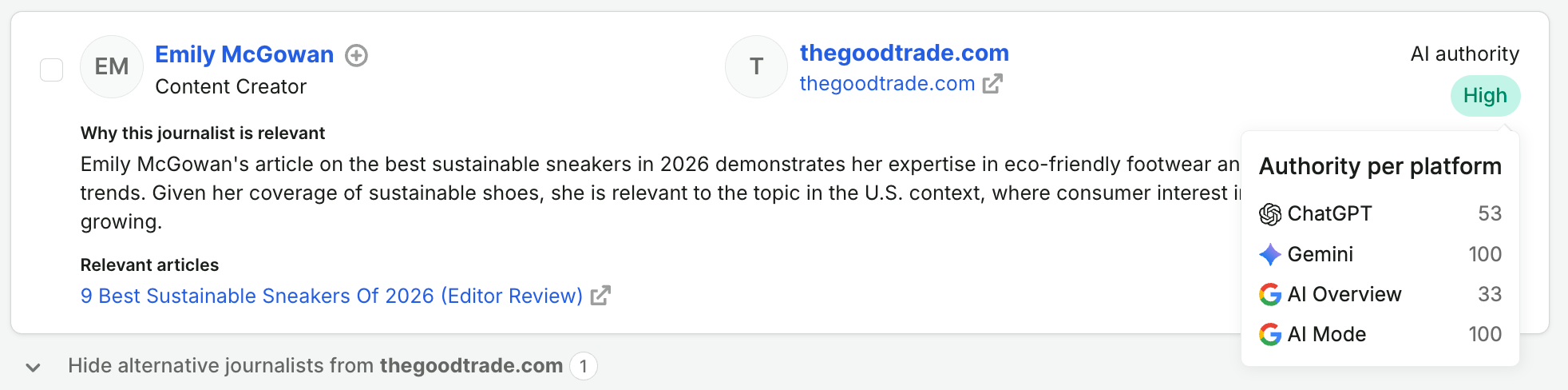
- AI Authority: A combined score based on how often an outlet is cited by AI platforms, how broadly it appears across them, and how balanced its performance is. It is displayed on a simple Low / Medium / High scale for your specific topic, language, and location.
To see the exact numbers behind the label, hover over the AI Authority badge next to an outlet. You'll see a 0–100 authority score for each AI platform included in your search.
Exploring different AI platforms
By default, results combine data from all supported AI platforms: ChatGPT, Gemini, Google AI Overview, and Google AI Mode. You can explore them together or one by one:
- Use the checkboxes above the results to select the AI platforms you're interested in
- Click Apply

The AI Authority of each outlet will recalculate based on the platforms you've selected. This is useful when your audience relies on one AI platform more than others — for example, if you care most about visibility in ChatGPT answers.
What do the metrics tell you: which outlets should you choose
Your goal should be to choose outlets with high AI Authority on the platforms that matter most to your brand.
Note: Less is more. It is better to pitch fewer, more impactful outlets with a more polished story than mass email obscure outlets with low visibility.
Finding the right journalists
Contributing journalists are displayed right under each media outlet - no extra steps needed. For some journalists, the system explains why they are relevant to your topic.
- Under each person, you can view their most recent relevant publication or click on their name to open more details
- Tick the boxes next to the journalists you want to reach out to. The Selected contacts counter on the right keeps track of your picks
- Click Add contacts to media list to save them for outreach
Note: If you want to add multiple journalists to a single list at once, select them by ticking the boxes next to their names.
If no relevant journalists are found for a given outlet, you can still click View all journalists to explore everyone who contributes to it.
To see more outlets, scroll to the bottom of the listing and load more results.

What is Pitch recommendation
Pitch recommendations are automatic suggestions of personalized, contextually relevant story ideas you might want to pitch to your selected journalists.
AI reviews your topic and the work these journalists have recently produced, then drafts a narrative that aligns with their interests. You'll find it in the Pitch idea based on your topic panel on the right side of the results.
Just click Generate personalized pitches to create story angles for this pitch idea. The pitch creation process is exactly the same as writing a regular email campaign.
Learn more: Creating and sending your first campaign
Managing your AI-Cited Media searches
Depending on your plan, you can create a limited number of searches each month:
- Base: 10 searches per month
- Pro: 30 searches per month
- Trial: As many searches as the plan you're trying allows
You can check how many searches you've used at the top of the page - for example, 4/30.
View your list of searches by going to the AI-Cited Media in the main menu.

You can view your searches at any time. Just open searches by clicking on them. You can also delete any search from your list by clicking on the bin icon.